

This reference covers the Prism 2.3 wire contract and how Polypheny-DB uses it. The schema index points to message declarations and field numbers. Follow the developer guide to implement a client.
Transport and versioning
| Stage | Bytes on the connection |
|---|---|
| Transport handshake | Each peer sends a one-byte length followed by the ASCII transport identifier and a line feed (0x0a). The length includes the line feed. Both peers verify the same identifier. |
| Message framing | After the handshake, each message starts with an eight-byte little-endian length, followed by exactly that many bytes of Protobuf data. The length is positive and excludes the prefix. |
The TCP identifier is plain-v1@polypheny.com. The Unix domain socket identifier is unix-v1@polypheny.com. Read the complete prefix and payload even if a socket read returns only part of either. Both transports use the same Protobuf messages. Plain TCP carries credentials and query data without encryption.
The first Protobuf request must be ConnectionRequest. The client sends its API major and minor versions, credentials and optional connection properties. Polypheny-DB checks that the major versions match and returns its own versions in ConnectionResponse. Proceed only after is_compatible is true. Use the reported minor version and the specific feature’s requirements when deciding what the connection supports. The transport identifier versions and the API version are independent.
| Connection input | Polypheny-DB behavior |
|---|---|
username, password |
TCP requires both fields. An empty password must still be present when the user has an empty password. On a Unix socket, omit username to use peer authentication. |
connection_properties.is_auto_commit |
Defaults to true when omitted at connection time. When disabled, use CommitRequest and RollbackRequest to end transactions. |
connection_properties.namespace_name |
Defaults to public when omitted at connection time. Execute and prepare requests can specify a namespace for that statement. |
ConnectionPropertiesUpdateRequest.connection_properties |
Updates the properties present in the request. An omitted property keeps its current value. |
When a request sets both properties, Polypheny-DB applies auto-commit before looking up the namespace. A namespace error can therefore leave the auto-commit mode changed. Send the namespace update in a separate request if it must succeed before changing auto-commit.
Request and response messages
Request.id is a positive uint64. Set one payload in Request.type and use a distinct ID for every outstanding request. Polypheny-DB processes requests in arrival order on a connection and echoes the ID in every associated Response. Read Response.type to identify the payload and Response.last to determine when the request is complete. A later FetchRequest uses a new request ID and refers to the open result by statement_id.
After login, request failures produce a terminal error_response with a human-readable ErrorResponse.message. A direct execution can return a statement or batch handle before the error. The standalone ErrorDetails schema defines optional code, state and message fields, but Response.error_response carries ErrorResponse. A version mismatch uses ConnectionResponse.is_compatible = false. A nonexistent namespace in the connection properties can close the socket during login before a Protobuf reply. A framing error can also end the exchange before a response arrives.
Remote procedure calls
The tables list every Request.type alternative. A name before parentheses is the envelope field and the name in parentheses is its message type. All requests can end with error_response.
Session and transactions
| Request field (message) | Success response field (message) | Effect |
|---|---|---|
connection_request (ConnectionRequest) |
connection_response (ConnectionResponse) |
Negotiate the API and authenticate. |
connection_check_request (ConnectionCheckRequest) |
connection_check_response (ConnectionCheckResponse) |
Confirm the session can respond. |
connection_properties_update_request (ConnectionPropertiesUpdateRequest) |
connection_properties_update_response (ConnectionPropertiesUpdateResponse) |
Change the session’s namespace or auto-commit setting. |
client_info_properties_request (ClientInfoPropertiesRequest) |
client_info_properties_response (ClientInfoProperties) |
Read the session’s string-valued client information. |
set_client_info_properties_request (ClientInfoProperties) |
set_client_info_properties_response (ClientInfoPropertiesResponse) |
Set or replace the supplied client information entries. |
commit_request (CommitRequest) |
commit_response (CommitResponse) |
Commit the current transaction. |
rollback_request (RollbackRequest) |
rollback_response (RollbackResponse) |
Roll back the current transaction. |
disconnect_request (DisconnectRequest) |
disconnect_response (DisconnectResponse) |
End the session. |
Statements and results
| Request field (message) | Success response field (message) | Effect |
|---|---|---|
execute_unparameterized_statement_request (ExecuteUnparameterizedStatementRequest) |
statement_response (StatementResponse) |
Execute a statement. An intermediate response supplies the statement ID. |
execute_unparameterized_statement_batch_request (ExecuteUnparameterizedStatementBatchRequest) |
statement_batch_response (StatementBatchResponse) |
Execute direct statements as a batch. An intermediate response supplies the batch ID. |
prepare_indexed_statement_request (PrepareStatementRequest) |
prepared_statement_signature (PreparedStatementSignature) |
Prepare a statement for positional parameters. |
prepare_named_statement_request (PrepareStatementRequest) |
prepared_statement_signature (PreparedStatementSignature) |
Prepare a statement for parameters supplied by name. |
execute_indexed_statement_request (ExecuteIndexedStatementRequest) |
statement_result (StatementResult) |
Execute a prepared statement with ordered parameters. |
execute_indexed_statement_batch_request (ExecuteIndexedStatementBatchRequest) |
statement_batch_response (StatementBatchResponse) |
Execute the same prepared statement with multiple parameter lists. |
execute_named_statement_request (ExecuteNamedStatementRequest) |
statement_result (StatementResult) |
Execute a prepared statement with a parameter map. |
fetch_request (FetchRequest) |
frame (Frame) |
Advance an open result by one page. |
close_result_request (CloseResultRequest) |
close_result_response (CloseResultResponse) |
Release the current result while retaining its statement handle. |
close_statement_request (CloseStatementRequest) |
close_statement_response (CloseStatementResponse) |
Release the statement or direct batch handle and its resources. |
Server and catalog metadata
| Request field (message) | Success response field (message) | Information |
|---|---|---|
dbms_version_request (DbmsVersionRequest) |
dbms_version_response (DbmsVersionResponse) |
Database product and version. For the Prism version, use ConnectionResponse. |
default_namespace_request (DefaultNamespaceRequest) |
default_namespace_response (DefaultNamespaceResponse) |
Built-in default namespace (public). |
table_types_request (TableTypesRequest) |
table_types_response (TableTypesResponse) |
Relational entity kinds. |
types_request (TypesRequest) |
types_response (TypesResponse) |
Type names, precision, literal delimiters and other type attributes. |
namespaces_request (NamespacesRequest) |
namespaces_response (NamespacesResponse) |
Namespaces matching optional name and model filters. |
entities_request (EntitiesRequest) |
entities_response (EntitiesResponse) |
Entities matching a name pattern in one namespace. |
procedures_request (ProceduresRequest) |
procedures_response (ProceduresResponse) |
Procedure catalog for a language and optional name pattern. Polypheny-DB currently returns an empty list. |
functions_request (FunctionsRequest) |
functions_response (FunctionsResponse) |
Functions for query_language and function_category. Use a Polypheny-DB function category name. |
sql_string_functions_request (SqlStringFunctionsRequest) |
sql_string_functions_response (MetaStringResponse) |
Comma-separated names of SQL string functions. |
sql_system_functions_request (SqlSystemFunctionsRequest) |
sql_system_functions_response (MetaStringResponse) |
Comma-separated names of SQL system functions. |
sql_time_date_functions_request (SqlTimeDateFunctionsRequest) |
sql_time_date_functions_response (MetaStringResponse) |
Comma-separated names of SQL date and time functions. |
sql_numeric_functions_request (SqlNumericFunctionsRequest) |
sql_numeric_functions_response (MetaStringResponse) |
Comma-separated names of SQL numeric functions. |
sql_keywords_request (SqlKeywordsRequest) |
sql_keywords_response (MetaStringResponse) |
SQL keywords reported by the server. Polypheny-DB currently returns an empty string. |
Statements and result lifetime
A direct request supplies language_name, statement and an optional namespace_name. Use sql, mongo or cypher for SQL, MongoQL or Cypher. Send one statement per direct request. Cypher rejects multiple statements in a single direct request, and a direct SQL request returns at most one statement result. The server first sends a StatementResponse with the statement_id in a response with Response.last = false. On success, the terminal response repeats the handle and includes StatementResponse.result.
Prepare requests supply the same language and namespace inputs. PreparedStatementSignature returns a statement_id and parameter_metas, including type name, precision, scale and parameter names when present. Indexed execution uses IndexedParameters.parameters in placeholder order. Named execution uses NamedParameters.parameters keyed by parameter name. Use the execute request that matches the prepare operation, and keep handles within the session that created them. Run Cypher through the direct execution request.
Batches
Use batches for statements that return scalar counts. A direct batch sends an intermediate StatementBatchResponse with a batch_id, followed on success by the same ID and scalars in statement order. A statement that returns a frame contributes the default scalar value 0 to a direct batch, even if the frame contains an update count. Execute that statement individually to read its frame. For an indexed prepared batch, send a non-empty list of parameter sets with the same shape. Polypheny-DB returns the prepared statement ID in batch_id and a single scalar count for the whole execution.
Close a direct batch with CloseStatementRequest using its batch ID. Close an indexed prepared batch using the prepared statement ID when you are finished with the statement. A terminal batch error contains an error message, and earlier operations in a direct batch may already have executed. Use an explicit transaction to commit or roll back data changes together.
Fetch and close
Test for presence of StatementResult.frame. When the frame is absent, scalar is the statement’s integer result, typically an update count. Zero is a valid value. MongoQL updates can return a DocumentFrame containing a document with an updateCount field.
When the frame is present, decode its result variant and fetch more pages until Frame.is_last is true. Response.last ends the response sequence for the current request, even when its frame has more pages. Each fetch advances the open result. An omitted fetch_size defaults to 100 on each execute or fetch request. A positive value bounds the number of source rows per frame. A size of zero advances no rows, and a negative size requests all remaining rows. A flattened graph page can contain more elements than source rows.
Use CloseResultRequest to release a result while retaining its statement handle. It requires a valid statement ID. CloseStatementRequest releases the handle and acknowledges an ID that is already gone. Closing a named prepared statement before its first execution can return an error after removing its handle. Commit or roll back explicit transactions on the same session after reading or closing their results.
Finish or close an open Cypher result before changing auto-commit. With auto-commit enabled, finish or close active results before starting a Cypher statement, and finish or close an open Cypher result before executing another statement. Reading the last Cypher page or closing its still-open result commits the transaction in auto-commit mode.
Result frames
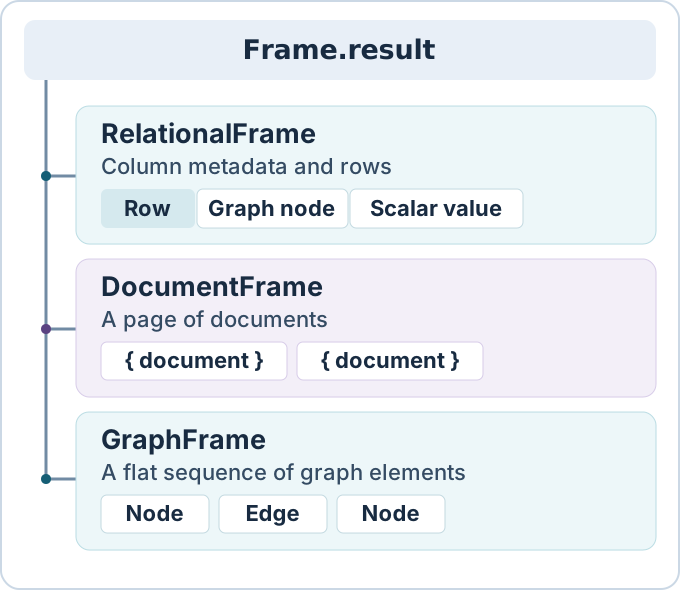
Dispatch on the Frame.result oneof. All pages of a result use the same variant. The query language and projection determine which variant Polypheny-DB sends.
| Variant | Contents | How to read it |
|---|---|---|
relational_frame |
RelationalFrame.column_meta and rows |
In each Row, match values to column metadata by position. SQL and tabular Cypher results use this format. Column metadata is available even when there are no rows. |
document_frame |
DocumentFrame.documents |
Each ProtoDocument.entries map contains string keys and typed ProtoValue values. MongoQL document results use this format. |
graph_frame |
GraphFrame.element |
Each GraphElement.element selects a ProtoNode or ProtoEdge. Graph-only Cypher results use this flat sequence. |
ColumnMeta.column_index is zero-based in a result frame. A ColumnMeta describes the output name and label, nullability, length, precision, scale, type and origin information where available. Read TypeMeta.proto_value_type for the declared logical type. An array can carry array_meta.element_type, and a structured type can carry struct_meta.field_metas. Decode the actual ProtoValue.value variant in each cell. For example, an integer column from a SQL VALUES expression can carry big_decimal and a nullable column can carry null.
Graph values in result rows
For Cypher, Polypheny-DB selects the result format from the projected column types. A graph-typed column has type NODE, EDGE, PATH or GRAPH. A projection with no graph-typed columns uses RelationalFrame. A projection of graph-typed columns only uses GraphFrame, which flattens graph values into nodes and edges and has no row or column boundaries. A mixed projection such as RETURN n, n.name uses RelationalFrame, preserving both columns and their positions. For mixed projections, the client must advertise minor version 3 or later in Prism major version 2. Polypheny-DB returns an upgrade error to earlier 2.x clients. A result can also carry typed graph values nested in lists, documents or graph property maps. The Cypher examples show how to decode flat graph frames and mixed rows.
A flat GraphFrame emits elements in projection and traversal order within a page. It omits null graph values and can repeat an element that occurs in more than one row or path. A mixed tabular result represents an explicit null as ProtoValue.null.
ProtoNode exposes an ID, a variable name when available, labels and a map of properties. Read a stored property named name from that map. ProtoEdge has the same fields plus the IDs of its left and right endpoints and a direction relative to them. Direction can be LEFT_TO_RIGHT, RIGHT_TO_LEFT or NONE, with UNSPECIFIED as its default. Nested graph values also require a client that advertises support for Prism 2.3.
ProtoPath
ProtoPath.nodes and ProtoPath.edges follow traversal order. A path has one more node than edge. Edge at index i connects nodes i and i + 1. Paths can visit a node more than once. Traversing an edge in reverse leaves its stored endpoints and direction intact.
ProtoGraph
ProtoGraph.nodes includes isolated nodes. ProtoGraph.edges contains the edges of the graph. Neither list has an ordering guarantee.
Value encodings
Each ProtoValue selects one field inside its value oneof. The field number identifies its encoding on the wire. An explicit database null selects null, an empty ProtoNull message. An unset oneof is distinct from a null value and can occur when an older binding receives a new variant. Use Protobuf presence methods for oneofs and optional fields. Plain scalar fields use Protobuf defaults.
ProtoValue.value field |
Number | Representation |
|---|---|---|
boolean |
1 | Protobuf bool. |
integer |
2 | Signed int32. Carries TINYINT, SMALLINT and INTEGER results. |
long |
3 | Signed int64. Carries BIGINT results. |
binary |
4 | Bytes. Polypheny-DB also uses this variant for file and media results. |
date |
5 | Signed int64 days relative to 1970-01-01. |
double |
6 | Double-precision floating point. |
float |
7 | Single-precision floating point. |
string |
8 | Protobuf string. Polypheny-DB also encodes geometry results as text. |
time |
9 | int32 milliseconds since midnight. |
timestamp |
10 | Signed int64 milliseconds since the Unix epoch. |
null |
11 | Empty message that indicates an explicit null. |
big_decimal |
12 | Signed big-endian two’s-complement unscaled_value bytes and a signed decimal scale. The value is the unscaled integer multiplied by 10 to the power of negative scale. For example, bytes fb 2e and scale 2 represent -12.34. |
interval |
13 | Signed months and milliseconds components. |
list |
16 | Ordered list of ProtoValue messages. |
document |
18 | Map from strings to ProtoValue messages. |
file |
19 | File bytes. Polypheny-DB accepts this variant as a parameter and emits binary for file results. |
node |
20 | ProtoNode. |
edge |
21 | ProtoEdge. |
path |
22 | ProtoPath. |
graph |
23 | ProtoGraph. |
ProtoPolyType is the logical type enum used by metadata. Its enum values are independent of the ProtoValue field numbers.
For statement parameters, Polypheny-DB decodes boolean, integer, long, binary, date, double, float, string, time, timestamp, null, big_decimal, list, document and file. The same alternatives apply inside list and document parameters.
Namespace and entity metadata
Use NamespacesRequest to discover namespace names and models. Set namespace_pattern to filter names and namespace_type to filter models using RELATIONAL, DOCUMENT or GRAPH in uppercase. NamespacesResponse.namespaces contains Namespace messages. Each reports namespace_name and can carry namespace_type. Polypheny-DB leaves is_case_sensitive at its Protobuf default of false.
Use EntitiesRequest.namespace_name to select one existing namespace. An unknown namespace returns an error. Set entity_pattern to filter entity names. In both namespace and entity filters, Polypheny-DB expands % to .* and _ to ., then matches the entire name as a Java regular expression. Other regex metacharacters keep their meaning. Omit the optional pattern to list all names for the request. Dispatch each EntitiesResponse.entities item through the Entity oneof.
Entity alternative |
Metadata |
|---|---|
table (Table) |
Namespace, table name and type, column definitions, optional primary key, foreign keys, exported keys and reported indexes. |
document (Document) |
Collection identity, observed document fields, an optional sample document, and reported indexes. |
graph (Graph) |
Empty marker for a matching graph entity. Graph query results use frame or value messages. |
Column is catalog metadata about stored columns. It includes the data type, nullability and one-based table position in column_index, and can include length, scale, a default value and collation. PrimaryKey names the table and carries its key columns. ForeignKey describes the local and referenced columns and update and delete rules. Index describes indexed columns, uniqueness and index details.
Document collection metadata
Prism 2.2 introduced collection metadata. Polypheny-DB infers paths, types and optionality from up to 100 documents per collection and returns the fields in path order. It inspects nested objects up to 32 path segments and treats an array as a single field. These are observations from a sample of the collection. An empty collection returns its namespace and name, an empty fields list, and no sample document. The collection metadata example shows how to request and read these fields.
Sampling uses the session’s active transaction when present. The fields and sample can therefore include the session’s uncommitted changes. The metadata request leaves that transaction open.
Document
| Field | Meaning |
|---|---|
namespace_name |
Namespace that contains the collection. |
collection_name |
Collection name. |
fields |
Repeated DocumentField observations. |
sample_document_json |
Optional JSON text for the first document in the sample. It can contain application data. The sample follows the collection scan order. Check field presence before reading it. |
document_indexes |
Repeated DocumentIndex entries reported by storage adapters. An empty list means the response supplied no index metadata. |
DocumentField
| Field | Meaning |
|---|---|
field_path |
Document path. A literal dot in a key is escaped as \. and a literal backslash as \\. For example, address.city identifies nested keys and address\.city identifies one key containing a dot. |
type_name |
Observed type such as string, int, double, bool, array or object. Floating-point and decimal values use double, and a mix of int and double also uses double. Other combinations of non-null types use mixed. A field observed only with null values uses null. |
is_optional |
True if the path was missing or null in at least one sampled document. |
DocumentIndex
| Field | Meaning |
|---|---|
field_path |
Indexed document path reported by the adapter. |
index_type |
Adapter-reported index type. |
unique |
True for a reported single-field unique index, for documents covered by that index. For compound indexes, the component paths have unique = false. |
Schema files
Browse the Prism API schemas by area to look up message fields and enum declarations. To generate bindings for a specific version, start with the schema archive in the developer guide.
| Area | Protobuf files |
|---|---|
| Envelope and errors | protointerface.proto, error.proto |
| Connections | connection_requests.proto, connection_responses.proto |
| Transactions | transaction_requests.proto, transaction_responses.proto |
| Statements | statement_requests.proto, statement_responses.proto |
| Frames | relational_frame.proto, document_frame.proto, graph_frame.proto |
| Values | value.proto |
| Namespace and entity metadata | namespace_meta_requests.proto, namespace_meta_responses.proto |
| Server and SQL metadata | meta_requests.proto, meta_responses.proto |