

Implement a Prism 2.3 client by generating or installing Protobuf bindings, opening a session, and exchanging framed requests and responses. The examples use Python over TCP. Applications can also connect using an existing driver.
Obtain the bindings
Choose bindings for the Prism API version your client implements. The release archives and packages use the same Protobuf schemas.
| Language | Prism 2.3 distribution |
|---|---|
| Java | Generate bindings from the Protobuf schemas in the org.polypheny:prism:2.3 JAR. |
| Python | polypheny-prism-api==2.3 on PyPI. |
| .NET | Polypheny.Prism version 2.3.0 on NuGet. |
| Go | Download go-api-files-2.3.tar.gz for the generated Go bindings. |
| Other languages | Generate code from protobuf-files-2.3.zip with protoc and a generator for your language. |
To generate Python bindings locally, unpack the schema archive and run these commands in the directory containing org, using a virtual environment. The generated modules import one another through org.polypheny.prism. Run your client from that directory or put it on your Python import path.
python -m pip install grpcio-tools==1.64.1 protobuf==5.27.2
python -m grpc_tools.protoc -I . --python_out=. org/polypheny/prism/*.proto
Transport and session
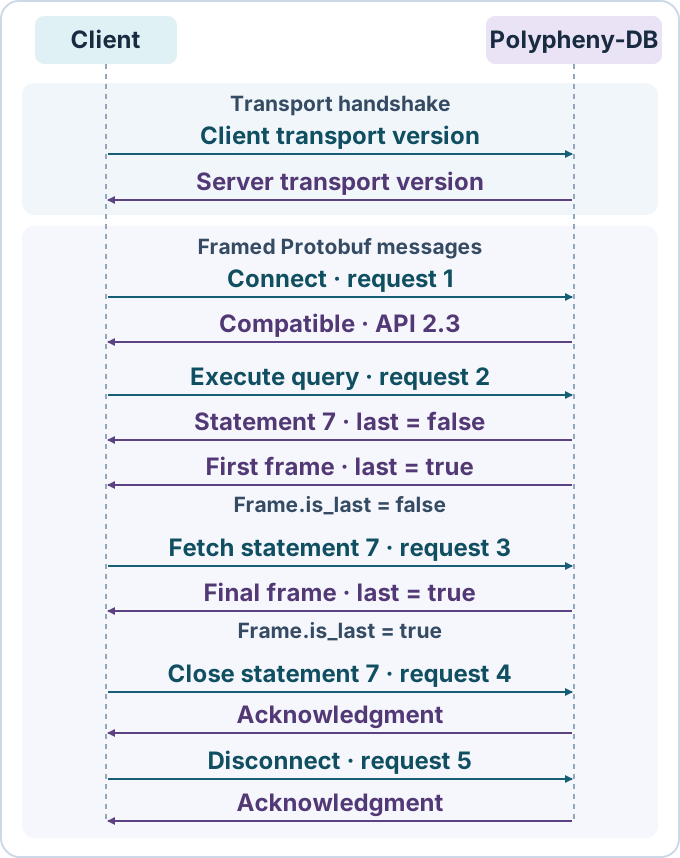
- Open the socket and exchange transport versions. Both peers send their identifier as US-ASCII with a trailing newline. A single byte precedes it and gives its length including the newline. For TCP use
plain-v1@polypheny.com\n(23 bytes with the newline). For a Unix domain socket useunix-v1@polypheny.com\n(22 bytes). Verify that the peer sent the same length and identifier. - Frame each Protobuf message. After the transport handshake, every
RequestorResponseconsists of an eight-byte little-endian length followed by that many payload bytes. The length is positive and excludes the prefix. The socket is a byte stream, so read both the prefix and the payload in full. - Open the Prism session. Send
connection_requestas the firstRequest.type, with the API major and minor versions the client implements. Polypheny-DB checks the major version and reports its own version inconnection_response. Continue whenis_compatibleis true. Invalid credentials produce anerror_response. Before using features introduced in a minor version, check the reported server version as well. - Correlate responses. Use a fresh positive
Request.idfor each call. A reply echoes that ID, andResponse.lastfinishes that request. InspectResponse.typefor the returned payload orerror_response. Send anotherFetchRequestonly when a result frame hasis_last = false. After login, you can useConnectionCheckRequestto check that the session can still exchange messages. - End the session. Release statement handles during the session, resolve explicit transactions, send
DisconnectRequest, wait forDisconnectResponse, and close the socket.
Authentication and connection properties
Plain TCP sends credentials and query data without encryption. Connect over a trusted network or through an encrypted tunnel. Set both username and password, including an explicitly empty password for the default local credentials. An unset password and an empty password are distinct in Protobuf.
For Unix peer authentication, omit username. Polypheny-DB maps the OS username to a database user. If no database user has that name and the peer runs as the same OS user as the server, it uses the default database administrator. To authenticate explicitly on a Unix socket, set both credential fields.
Set connection_properties.namespace_name at login to choose a session namespace. Polypheny-DB defaults to public and enables auto-commit when the corresponding properties are omitted. A direct or prepared statement can specify its own namespace_name. Use ConnectionPropertiesUpdateRequest to update selected properties during the session.
Run a query over TCP
Start the plain Prism interface on a Polypheny-DB server with Prism 2.3. The example defaults to 127.0.0.1:20590, user pa, and an empty password, as on a fresh local installation. Set PRISM_HOST, PRISM_PORT, PRISM_USER, and PRISM_PASSWORD to override those defaults.
Install the bindings in a Python virtual environment.
python -m pip install polypheny-prism-api==2.3
Save the example as prism_client.py and run python prism_client.py. It prints Ada and Lin, one per line. The small page size forces a FetchRequest after execution. The client handles one request at a time. The example uses a 10-second socket timeout and a 16 MiB limit per response payload.
import os
import socket
import struct
from contextlib import contextmanager, suppress
from itertools import count

from org.polypheny.prism import connection_requests_pb2 as connections
from org.polypheny.prism import protointerface_pb2 as protocol
from org.polypheny.prism import statement_requests_pb2 as statements

MAX_RESPONSE_BYTES = 16 * 1024 * 1024


class PrismError(RuntimeError):
    """The server returned an error for the current request."""


def read_exact(sock, size):
    data = bytearray()
    while len(data) < size:
        chunk = sock.recv(size - len(data))
        if not chunk:
            raise EOFError("Prism closed the connection")
        data.extend(chunk)
    return bytes(data)


class PrismClient:
    def __init__(self, sock):
        self.sock = sock
        self.request_ids = count(1)

    def _responses(self, request_field, payload, response_field):
        request = protocol.Request(id=next(self.request_ids))
        getattr(request, request_field).CopyFrom(payload)
        data = request.SerializeToString()
        try:
            self.sock.sendall(struct.pack("<Q", len(data)) + data)
            while True:
                (size,) = struct.unpack("<Q", read_exact(self.sock, 8))
                if not 0 < size <= MAX_RESPONSE_BYTES:
                    raise RuntimeError(f"Unexpected Prism response length {size}")
                response = protocol.Response.FromString(read_exact(self.sock, size))
                if response.id != request.id:
                    raise RuntimeError(f"Unexpected Prism response ID {response.id}")
                actual = response.WhichOneof("type")
                if actual == "error_response" and response.last:
                    raise PrismError(response.error_response.message)
                if actual != response_field:
                    raise RuntimeError(f"Expected {response_field}, received {actual}")
                yield getattr(response, response_field)
                if response.last:
                    return
        except PrismError:
            raise
        except BaseException:
            # An interrupted or invalid exchange can leave unread response bytes.
            self.sock.close()
            raise

    def call(self, request_field, payload, response_field):
        for final in self._responses(request_field, payload, response_field):
            pass
        return final

    def close_statement(self, statement_id):
        if self.sock.fileno() != -1:
            self.call(
                "close_statement_request",
                statements.CloseStatementRequest(statement_id=statement_id),
                "close_statement_response",
            )

    @contextmanager
    def execute(self, statement, *, language="sql", namespace=None, fetch_size=100):
        query = statements.ExecuteUnparameterizedStatementRequest(
            language_name=language, statement=statement, fetch_size=fetch_size
        )
        if namespace is not None:
            query.namespace_name = namespace

        statement_id = None
        try:
            for reply in self._responses(
                "execute_unparameterized_statement_request", query, "statement_response"
            ):
                if statement_id is not None and reply.statement_id != statement_id:
                    self.sock.close()
                    raise RuntimeError("Statement ID changed during execution")
                statement_id = reply.statement_id
            if not reply.HasField("result"):
                raise RuntimeError("Final statement response is missing its result")
            yield reply
        except BaseException:
            if statement_id is not None:
                with suppress(Exception):
                    self.close_statement(statement_id)
            raise
        else:
            self.close_statement(statement_id)

    def frames(self, statement, *, fetch_size=100):
        if fetch_size == 0:
            raise ValueError("Fetch size must be nonzero when iterating through results")
        if not statement.result.HasField("frame"):
            raise ValueError("The statement returned a scalar result")
        frame = statement.result.frame
        kind = frame.WhichOneof("result")
        if kind is None:
            raise RuntimeError("Result frame has no payload")

        while True:
            if frame.WhichOneof("result") != kind:
                raise RuntimeError("Result frame type changed during fetch")
            yield frame
            if frame.is_last:
                return
            frame = self.call(
                "fetch_request",
                statements.FetchRequest(
                    statement_id=statement.statement_id, fetch_size=fetch_size
                ),
                "frame",
            )


@contextmanager
def open_session(*, auto_commit=None):
    address = (os.getenv("PRISM_HOST", "127.0.0.1"), int(os.getenv("PRISM_PORT", "20590")))
    with socket.create_connection(address, timeout=10) as sock:
        version = b"plain-v1@polypheny.com\n"
        sock.sendall(bytes([len(version)]) + version)
        size = read_exact(sock, 1)[0]
        if size != len(version) or read_exact(sock, size) != version:
            raise RuntimeError("Unexpected Prism transport version")

        client = PrismClient(sock)
        login = connections.ConnectionRequest(
            major_api_version=2,
            minor_api_version=3,
            username=os.getenv("PRISM_USER", "pa"),
            password=os.getenv("PRISM_PASSWORD", ""),
        )
        if auto_commit is not None:
            login.connection_properties.is_auto_commit = auto_commit
        connected = client.call("connection_request", login, "connection_response")
        client.server_api_version = (connected.major_api_version, connected.minor_api_version)
        if not connected.is_compatible:
            version = f"{connected.major_api_version}.{connected.minor_api_version}"
            raise RuntimeError(f"Incompatible Prism API version {version}")

        yield client
        if sock.fileno() != -1:
            client.call("disconnect_request", connections.DisconnectRequest(), "disconnect_response")


if __name__ == "__main__":
    with open_session() as client:
        sql = "SELECT name FROM (VALUES ('Ada'), ('Lin')) AS example(name) ORDER BY name"
        with client.execute(sql, fetch_size=1) as statement:
            for frame in client.frames(statement, fetch_size=1):
                if frame.WhichOneof("result") != "relational_frame":
                    raise RuntimeError("Expected a relational frame")
                for row in frame.relational_frame.rows:
                    print(row.values[0].string.string)
On a successful direct execution, the initial StatementResponse gives the statement ID and the terminal one includes the result. Each fetch or close uses a fresh request ID and the same statement ID. The client retains the handle so it can release it after a server error or an exception while consuming results. A timeout, broken connection or invalid response envelope closes the socket. Reconnect before issuing another request. Polypheny-DB releases remaining handles when the session closes. Use client.server_api_version to check the server’s major and minor version before requesting a version-specific feature.
Check whether StatementResult.frame is present. A frame carries an initial page of rows, documents, or graph elements. A scalar result typically reports the number of affected rows in StatementResult.scalar, where zero is valid. Dispatch each frame through its result oneof, as in the graph example. Use a nonzero fetch size with client.frames() so that each fetch advances the cursor. Use fetch_size=0 on the initial execution to read tabular column metadata before fetching rows.
Reuse and close a statement
- Send a
PrepareStatementRequestas theprepare_indexed_statement_requestorprepare_named_statement_requestpayload. ReadPreparedStatementSignature.statement_idand its parameter metadata. - Send the matching execute request with that ID and the parameter values. For indexed SQL placeholders (
?), supply values in statement order. For named SQL placeholders (:name), supply a map with keys such asname. Use a supported value encoding that matches the expected parameter type. - Read the
StatementResult. Fetch more frames with the prepared statement ID if necessary. To discard the current result while keeping the handle, sendCloseResultRequest. Close the handle withCloseStatementRequestwhen finished.
Named preparation can interpret text such as :name inside a SQL string literal as a placeholder and rewrite the literal. Use indexed parameters when the statement contains such text.
Save this as prism_prepared.py beside prism_client.py. It executes the same prepared SQL statement for two values and prints Ada and Lin. Both executions return their only row in the first frame.
from org.polypheny.prism import statement_requests_pb2 as statements
from org.polypheny.prism import value_pb2 as values

from prism_client import open_session

with open_session() as client:
    signature = client.call(
        "prepare_indexed_statement_request",
        statements.PrepareStatementRequest(
            language_name="sql", statement="SELECT CAST(? AS VARCHAR(20)) AS name"
        ),
        "prepared_statement_signature",
    )
    try:
        for name in ["Ada", "Lin"]:
            parameters = statements.IndexedParameters(
                parameters=[values.ProtoValue(string=values.ProtoString(string=name))]
            )
            result = client.call(
                "execute_indexed_statement_request",
                statements.ExecuteIndexedStatementRequest(
                    statement_id=signature.statement_id, parameters=parameters
                ),
                "statement_result",
            )
            print(result.frame.relational_frame.rows[0].values[0].string.string)
    finally:
        client.close_statement(signature.statement_id)
Use batches for statements that return scalar counts. Execute statements individually to read results carried in frames, including MongoQL update counts returned in a DocumentFrame. A direct batch groups multiple unparameterized statements and returns StatementBatchResponse.scalars. Release it by passing its batch_id as CloseStatementRequest.statement_id. An indexed batch runs one prepared statement with multiple sets of values. Close that prepared statement when you finish using it.
Control transactions
With auto-commit enabled, a query can keep its transaction open while there are pages left to fetch. For Cypher, fetching the final page or explicitly closing an open result commits its transaction. Finish or close an open result before running another statement that uses the session transaction.
To manage a transaction explicitly, set ConnectionProperties.is_auto_commit = false when opening the session. The example client exposes this as open_session(auto_commit=False). The session starts a transaction when a statement needs one. Finish or close result sets before sending CommitRequest to keep changes or RollbackRequest to discard them. Wait for the corresponding acknowledgment. With no active transaction, either request returns its acknowledgment without changing data.
Commit or roll back pending work before changing auto-commit with ConnectionPropertiesUpdateRequest. Updating this setting changes whether subsequent operations auto-commit. On disconnect, Polypheny-DB closes the session’s statements and rolls back any active transaction.
Diagnose connection failures
| Symptom | What to check |
|---|---|
| TCP connection refused | Listener status and configured port in the Polypheny-DB UI, plus any container port mapping. |
| Transport version mismatch | The selected listener and the exact length-prefixed transport identifier, including its newline. |
is_compatible = false |
The client’s Prism API major version and the major version reported by the server. |
| Authentication error | The Polypheny-DB username and password, or the peer OS user for Unix socket authentication. |
error_response during a query or fetch |
The error message, request ID, and the statement ID if one has been assigned. A lost connection during execution can leave the statement’s outcome unknown. |